ASIHTTPRequest causes your iOS application to crash in a release build
Problem
Your iOS application crashes in release builds when making web requests using the ASIHTTPRequest library.
Solution
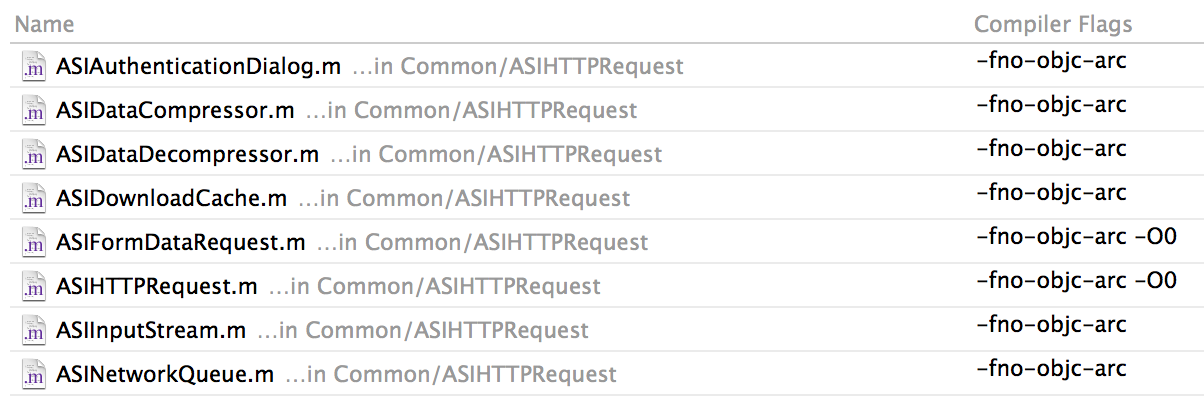
Disable optimisations on the files ASIFormDataRequest.m and ASIHTTPRequest.m by adding the flag ‘-O0’ (capital letter O followed by zero).
Background
After upgrading to XCode 5 (and what a lovely upgrade that was!) I ran in to a strange problem with one of my apps crashing when I tried to login. At first I thought it was related to the new enterprise distribution setup I had just created, but looking at the crash dump it was occurring when I tried to make a HTTP request. My first thought was, well I guess its about time to finally replace ASIHTTPRequest since it was deprecated some years ago now, but I really didn’t have time for that right now.
Instead I turned to my trusty companion, Google, and started searching. I really couldn’t find much on this, mostly because I figured it was related to something new in XCode 5, but soon enough I found a StackOverflow post that referred to a Google groups discussion from some years back. Luckily the fix is very simple (although more of a hack than a fix) and simply requires you to disable optimisations for two of the ASIHTTPRequest files.
Navigate to the ‘Build Phases’ tab for your target and add the compiler flag -O0 (capital letter O followed by zero) to the files ASIFormDataRequest.m and ASIHTTPRequest.m
Lo and behold, after adding the necessary flags, everything worked as before, buying me some more time to plan a replacement for ASIHTTPRequest.